Microsoft 365 outage
The ongoing Microsoft 365 outage is causing the Endex add-in to disappear from Office apps or become blocked for some users. The issue is on Microsoft’s side, and we expect it to resolve once Microsoft completes its recovery.
If Endex is still working for you, no action is needed.
Live updates
Status: ongoing. Microsoft has not yet declared the incident resolved. Latest first. For Microsoft’s own updates, see the Microsoft 365 status page.
Friday, Nov 13
- 4:10 PM ET21:10 UTCEndexLatest
Microsoft’s 4 PM update not yet posted
Microsoft’s status page still shows “Service degradation,” and the update it promised for 4:00 PM ET hasn’t appeared yet. Microsoft says it is still restoring service to remaining customers and regions. We’ll add it here as soon as it’s out. Source - 3:20 PM ET20:20 UTCEndex
Still ongoing for some customers
Microsoft has not declared the incident resolved, and some customers are still seeing the Endex add-in missing or blocked in Office. Microsoft’s next update is expected at 4:00 PM ET. We’ll keep this page updated. - 3:00 PM ET20:00 UTCEndex
Reinstall steps published
We published this page with steps to reinstall the Endex add-in. If you’re still blocked, email support@endex.ai. - 1:57 PM ET18:57 UTCMicrosoft
Microsoft: recovery underway, not yet complete
Microsoft says it is “seeing broad recovery and stability” and continues “to restore service to remaining customers and regions,” restoring services gradually. It says the incident was introduced by an issue during an earlier network capacity upgrade and was not related to cyber or AI / agents. Status remains “Service degradation.” Source - 1:40 AM ET06:40 UTCNews
Outage passes 12 hours
Reports say Microsoft’s fixes kept failing overnight and the outage stretched past 12 hours without marked improvement. Source
Thursday, Nov 12
- 11:11 PM ET04:11 UTCMicrosoft
No sign of malicious activity
Microsoft says it has found “no indication this is the result of malicious activity.” Source - 7:35 PM ET00:35 UTCMicrosoft
Servers return, then fail again under load
Some servers come back but, per Microsoft, “can become unresponsive again once they begin receiving traffic.” Source - 6:06 PM ET23:06 UTCMicrosoft
Fixes not yet working
Microsoft says “our actions taken thus far have not provided the anticipated relief” and that “a core process on the affected servers is becoming overwhelmed.” Source - 5:00 PM ET22:00 UTCMicrosoft
Partial fix for some servers
Microsoft “found and validated an alternative service health check method, which allowed a subset of affected servers to successfully return to service.” Source - 2:03 PM ET19:03 UTCMicrosoft
Outlook users locked out of inboxes
Outlook users can’t reach their inboxes. The issue is first flagged in the Americas, then expands to any region. Microsoft says it is “redistributing connection traffic across our broader worldwide infrastructure to help balance the load.” Source - 1:00 PM ET18:00 UTCNews
Outage begins
Microsoft 365 services that interact with Exchange Online and email start failing, including Outlook, Teams, Copilot and Defender for Office 365. Intune and the Microsoft 365 Apps admin center also go down. Source
If Endex is missing
You can try reinstalling it with the steps below. Until Microsoft’s recovery is complete, these steps may not be successful:
- Save your work, fully close the application, and reopen it.
- Go to Home › Add-ins, search Endex AI (or Endex for Outlook in Outlook), and select Add.
- If it doesn’t appear or won’t install, try the links below:
If the add-in is blocked
If you see a message saying the add-in has been blocked by your administrator or that your organization prevents installing Office Store add-ins, this is likely related to Microsoft’s outage.
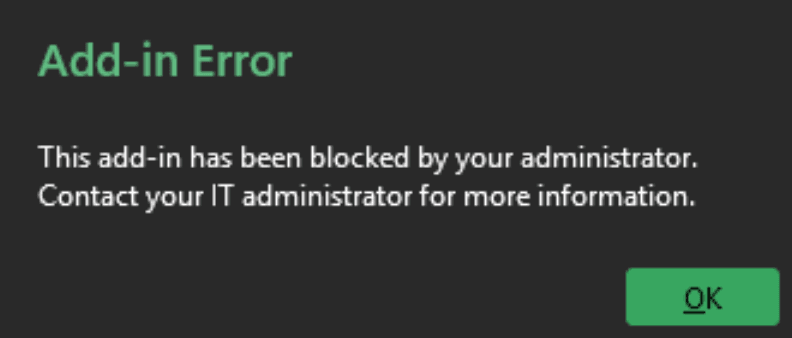
If your company deployed Endex for you, it should reappear under “Built for your org” in the Add-ins window once Microsoft recovers. If it doesn’t, email us at support@endex.ai and we’ll coordinate with your IT team to check your organization’s add-in settings.
Still having trouble?
Email support@endex.ai with the affected application and a screenshot of any error, and we’ll help directly.